ShurIQ Progress · w17·2026
◉ Progress report · Internal · w17 · 2026

Fifteen screens, three surfaces, one operating system.

Every brief we write has always followed a grammar. For the last few months we ran that grammar out of our heads; now it runs out of a tool. This is what I built with Claude Design over the past ten days — the Report Studio, the Verticals layer, and the Visual Insights Hub — and the shorter list of what still has to get built before Nuri, Limore, and Diana can run a scan without me in the loop.

15
Screens built
3
Surfaces
6
Viz viewports
v0.2a
Grammar locked
6
Rollout stages

§ 01 · The argument

We have a grammar. Now it needs a factory.

The Studio turns a messy intake into an auditable intelligence brief — with the same section vocabulary, the same citation discipline, and the same handoff to a visual companion — every single time.

For every ShurIQ brief we've ever shipped, the shape has been consistent: a named story up top, a competitive context beneath it, three or four gaps priced as business moves, and a visual companion that lets the reader poke at the evidence. Grammar v0.2a froze that shape into a 19-section spec with three archetypes — Editorial Brief, Pressure Test, Cold Read. Diana, Limore, and Nuri have the spec open in a Google Doc right now.

The Studio is the production tool that enforces the grammar. An operator pastes in a brief, picks an archetype, watches the Generation run, and lands in an editor where every section is traceable, every claim cited, and every visual companion auto-wired. The output is two artifacts: a Published Report (editorial longform) and a Visual Insights Hub (six viewports on the same ontology). Plus the Method appendix so a skeptical reader can diff the math.

The pages on this report are the surface layer of that factory — a week and a half of Claude Design iterations, now staged for a real build.

"Every brief, pressure test, and cold read the bench is carrying — with its version, archetype, and where the argument currently sits."
— Dashboard tagline, the operating thesis of the tool

§ 02 · What got built

Three surfaces, fifteen screens.

The Studio is the operator tool. The Verticals layer is where competitive ranking lives. The Viz Hub is the client-facing reading room for the six viewports. Everything routes between them through a single black topbar.

Each screen below is clickable into the Claude Design prototype. The screenshots show real data for our w17 TruData Solutions pilot brief — not lorem, not mock stubs, not placeholders. Every number, vertical, archetype, and command you see has been plumbed through the grammar.


§ 03 · The Studio · nine screens

The operator's workbench.

Dashboard in; published report and viz hub out. In between: intake, generation, editorial surface, rubric authoring, version archive.

S01 · Dashboard

The work across the bench.

Built

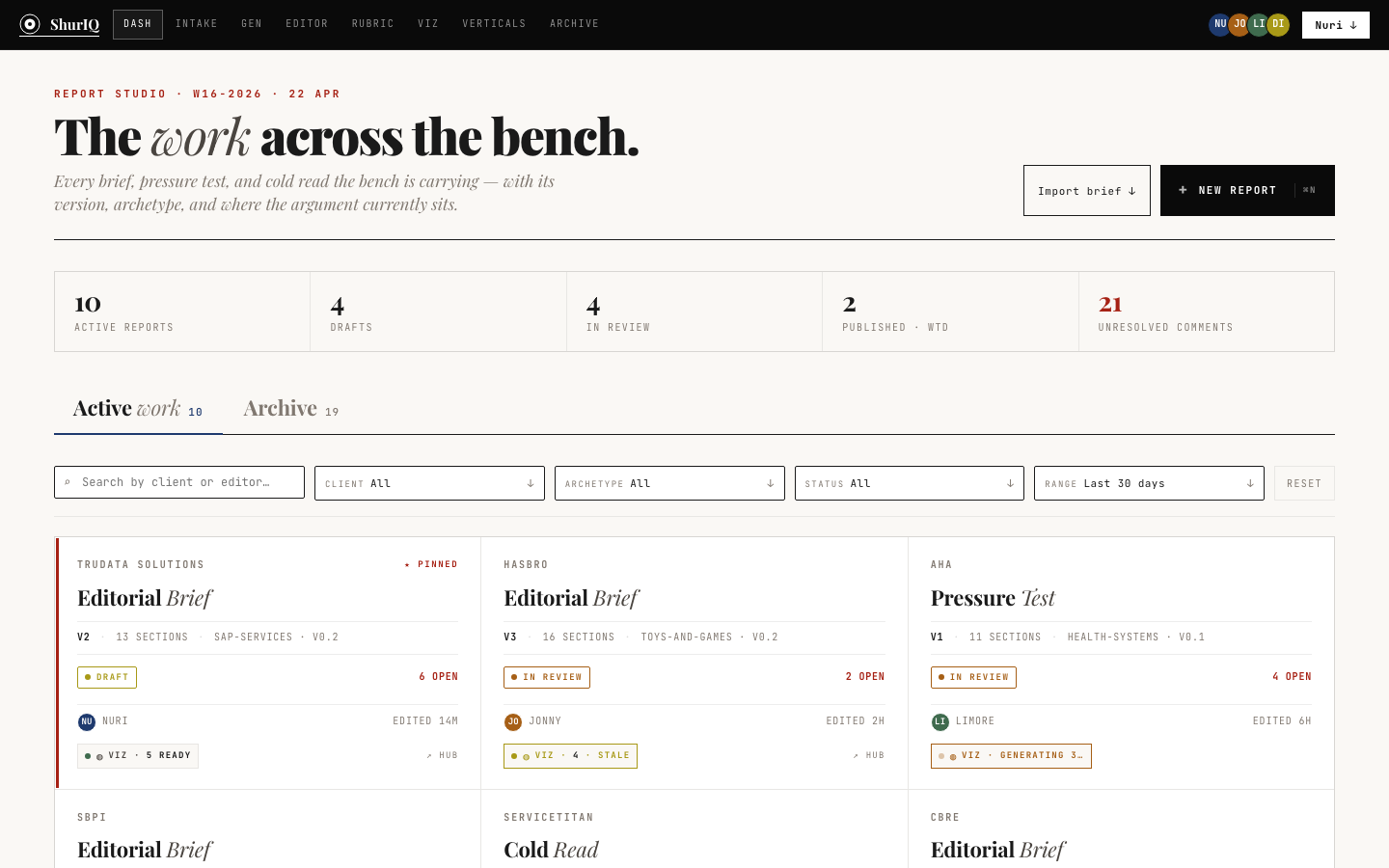
The landing surface. Every active report — brief, pressure test, cold read — shows up as a card with client, version, archetype, status, rubric binding, and where the viz pipeline currently sits. Five-stat strip up top: active reports, drafts, in review, published-week-to-date, unresolved comments.

Filters by client, archetype, status, editor, and date range. The "pinned" pilot stays visible. One primary CTA — New Report — kicks off intake.
PurposeStatus across all active briefs PrimaryLaunch a new report Imports StatusInteractions mocked
Dashboard screenshot
S02 · Intake

Hand ShurIQ a messy brief. It reads it back.

Built

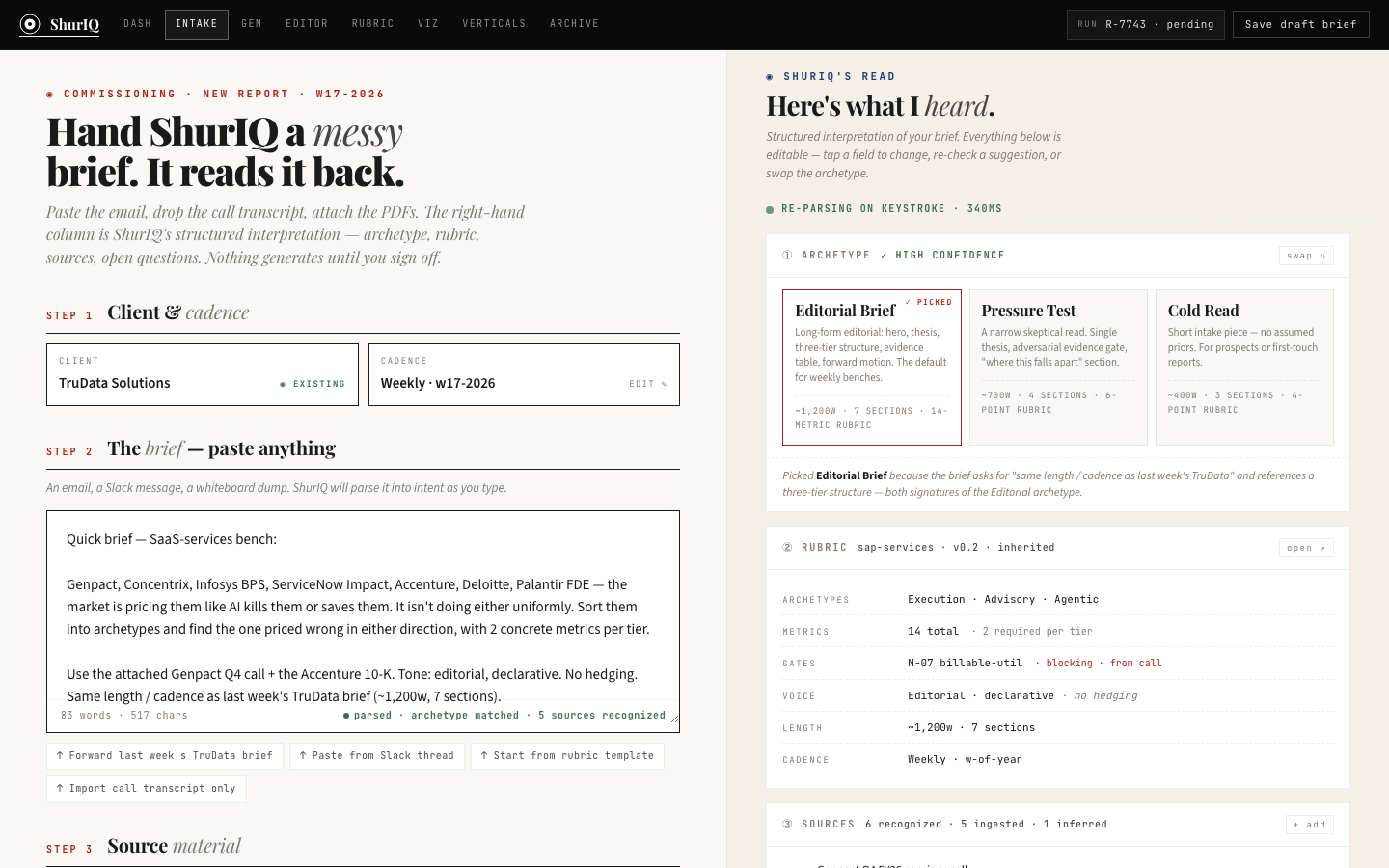
Paste, dictate, or forward — the intake accepts anything. The system extracts client, cadence, archetype (Editorial Brief / Pressure Test / Cold Read), the declared peer set, the rubric version, and the open questions. The right pane plays it back as a structured read-through so the operator can confirm or correct before generation.

The three archetype cards at top-right make the grammar visible: Editorial is declarative (the argument exists, make it). Pressure Test is adversarial (the argument is weak, name what breaks). Cold Read is exploratory (there is no argument yet, find one).

PurposeTurn intake into a structured brief PrimarySelect archetype + commit ImportsGrammar §01 Intake schema StatusExtraction mocked, schema wired
Intake screenshot
S03 · Generation

Assembling — seven sections, from rubric up.

Built

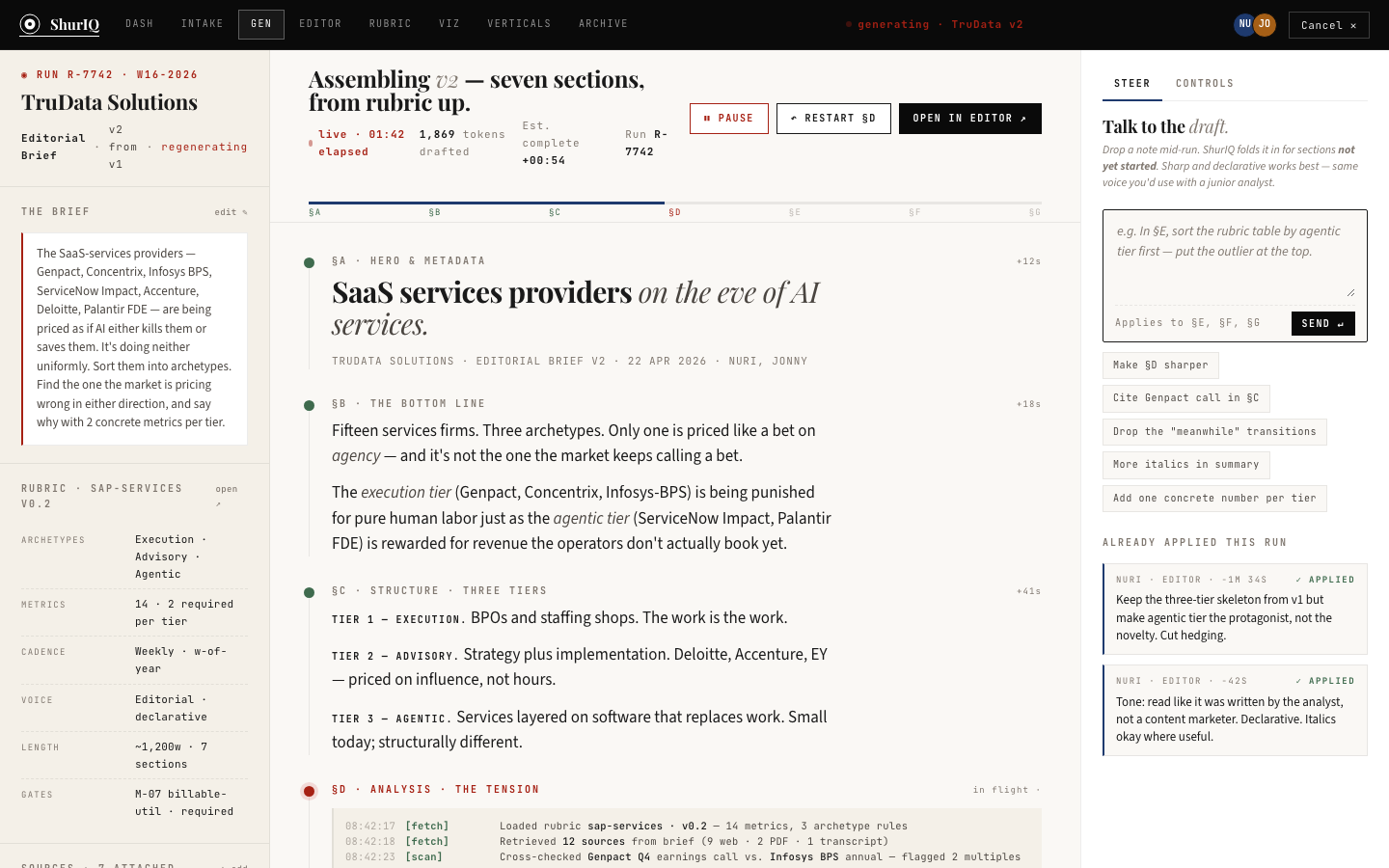
The generation surface is the inside of the machine, shown. As each section composes — Hero, Numbers Spine, Stack Rank, Gap Analysis, Brand Power — the operator sees the running state, the citations pulling in, and the rubric checks passing or gap-flagging. Nothing hidden. Nothing generated without a source.

The bottom panel is a live transcript; every claim, every rubric verification, every gap-flag emits a line. If the operator needs to steer, they type directly into the steering box on the right — e.g. "In §E, sort the rubric table by agentic tier first."

PurposeCompose the brief with live audit PrimaryWatch & steer generation ImportsGrammar §03-17, Rubric engine StatusUI built, engine hookup pending
Generation screenshot
S04 · Report Studio

Three panes: inventory, document, talk to the draft.

Built

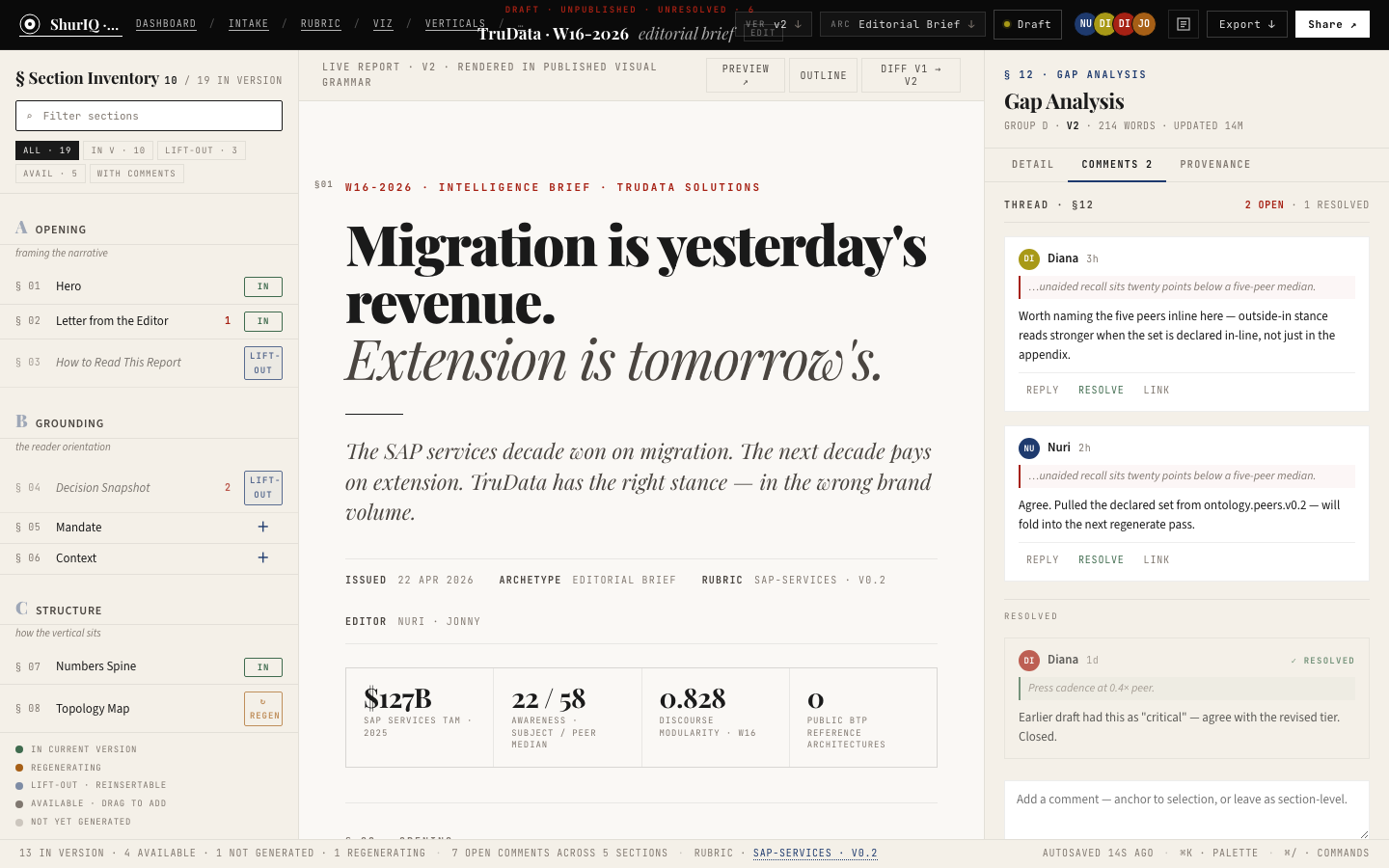
The editor. Left pane is the Section Inventory — the 19-section grammar, each with its status (ready, stale, gap-flagged). Middle pane is the document itself, rendered as the client will see it, but fully editable. Right pane is the Talk to the draft conversation — the operator edits in prose, not keystrokes.

Comments (Diana's, Nuri's, Limore's) thread against sections. Headline chrome at top exposes the command vocabulary: stack rank by loyalty-weighted betweenness, demote to optional, emit gap-flag. Three-layer command surface built out: hover quick-actions, slash palette, help drawer.

PurposeEdit, steer, review a live brief PrimaryAuthoring + review loop ImportsDocumentSurface · DetailPane · Inventory · Grammar §08 verbs StatusUI complete · collab state stubbed
Report Studio screenshot
S05 · Rubric Studio

Billable utilization — the publication gate.

Built

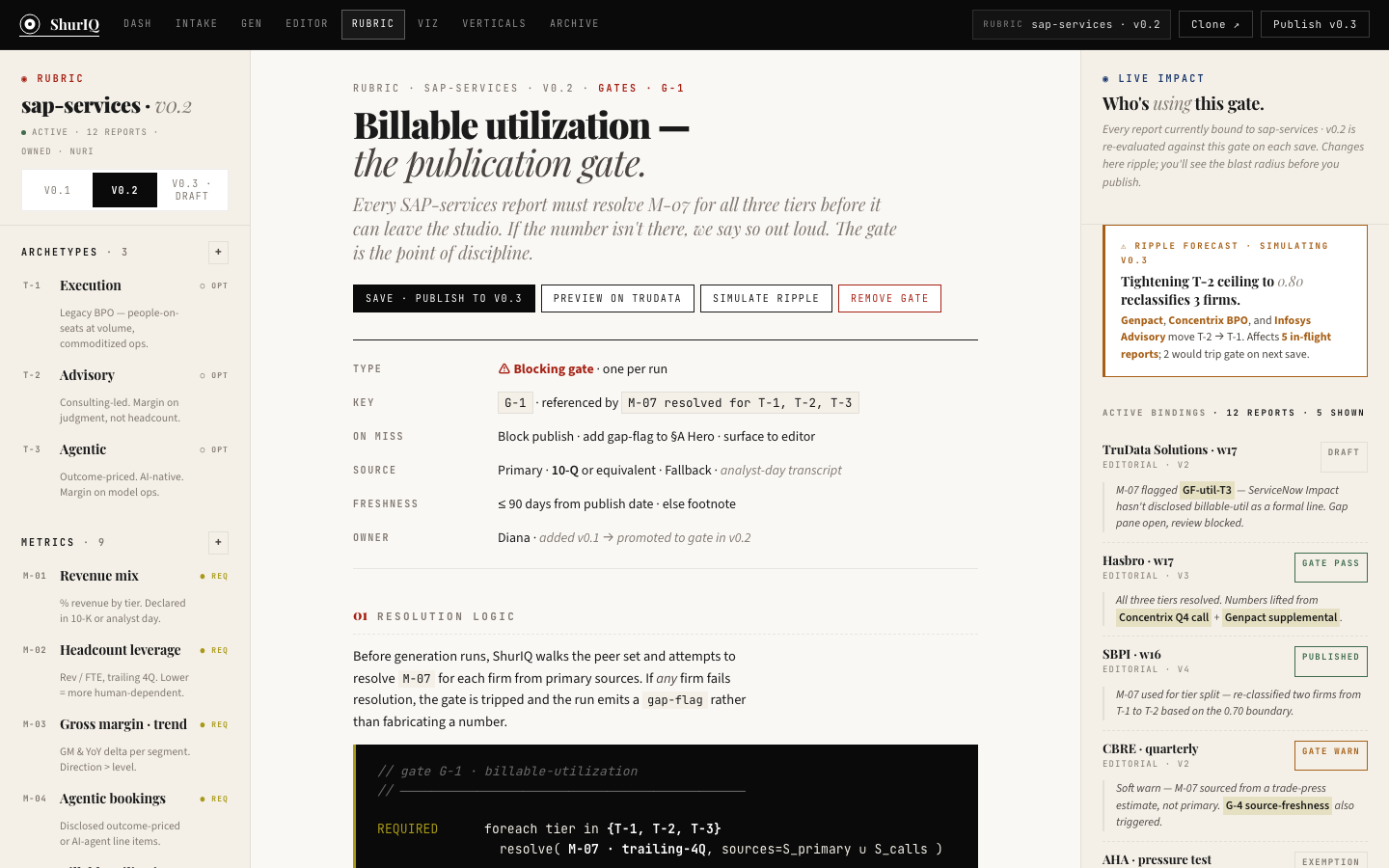
The rubric is not a style guide — it's a contract. Every KPI-bearing paragraph must have a declared source, a tier, a resolution, and a publication gate. Rubric Studio is where an operator authors and binds those rules to a vertical ("SAP Services v0.2"), commits a version, and traces every call-site across the corpus.

On miss, the engine emits a gap-flag. On hit, the paragraph clears the gate. This surface was the unlock for making generation auditable — without it, "the report has numbers" becomes "we hope the numbers are right."

PurposeRule authoring + publication gate PrimaryBind rubric version to reports ImportsGrammar §06 ensures, §17 gates StatusUI built · tests pending live data
Rubric Studio screenshot
S06 · Published Report

Migration is yesterday's revenue. Extension is tomorrow's.

Built

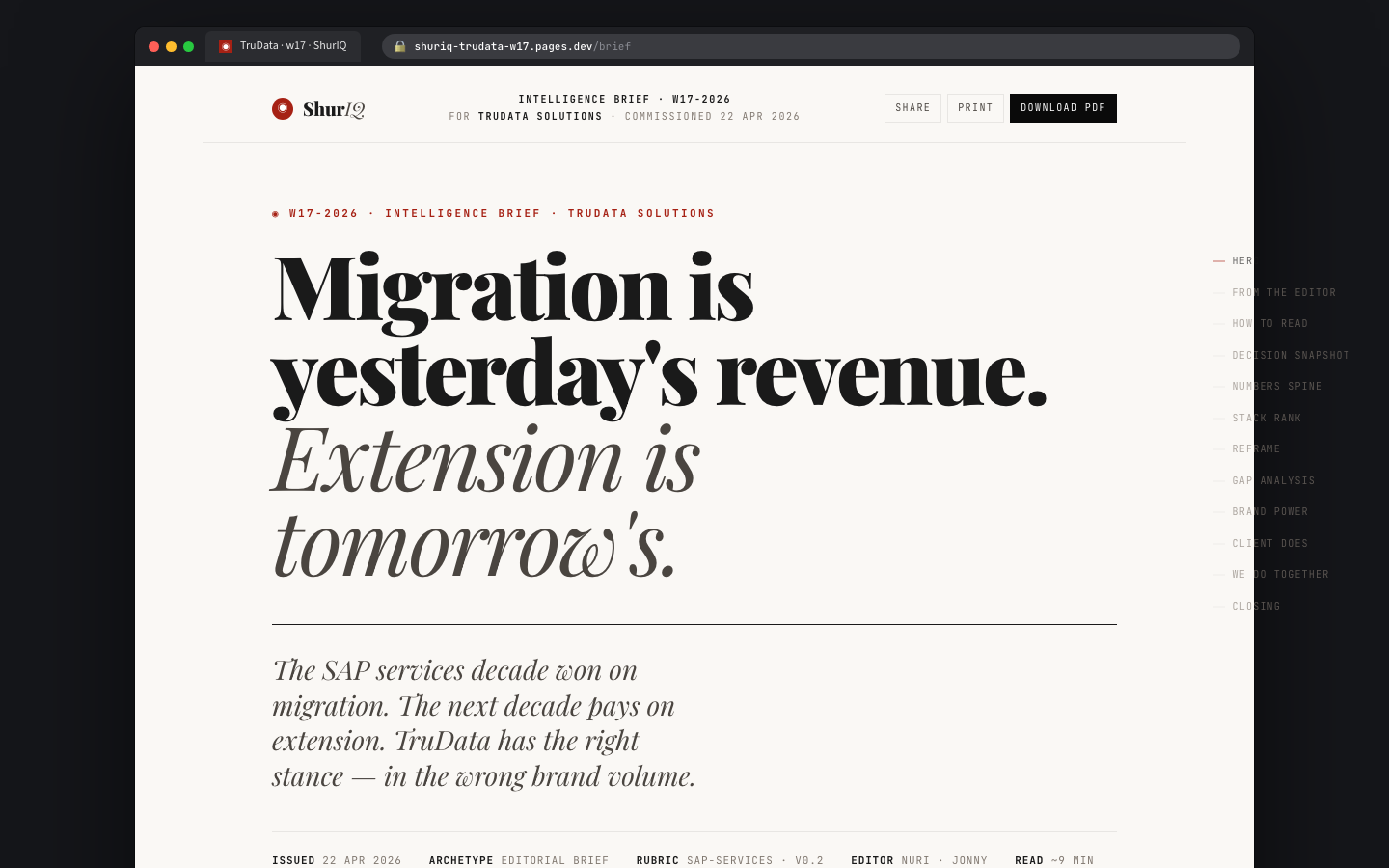
The client-facing output. What an operator makes inside the Studio ships here. Editorial long-form — hero, How to read, Decision Snapshot, Numbers Spine, Stack Rank, Pipeline, Gap Analysis, Brand Power Pentagon (now SAS), Who Does, Me Together, Closing. Every number clickable back to its source; every chart resolvable as a standalone viewport via the Viz Hub.

Share, Print, Download PDF built into the chrome. Right rail is the section contents, always visible. The brief becomes a document that a CMO, a CRO, and an analyst each get what they need out of.

PurposeWhat the client reads PrimaryLong-form delivery ImportsGrammar §01-17, Viz Hub links StatusPixel-perfect · data hooked to pilot
Published Report screenshot
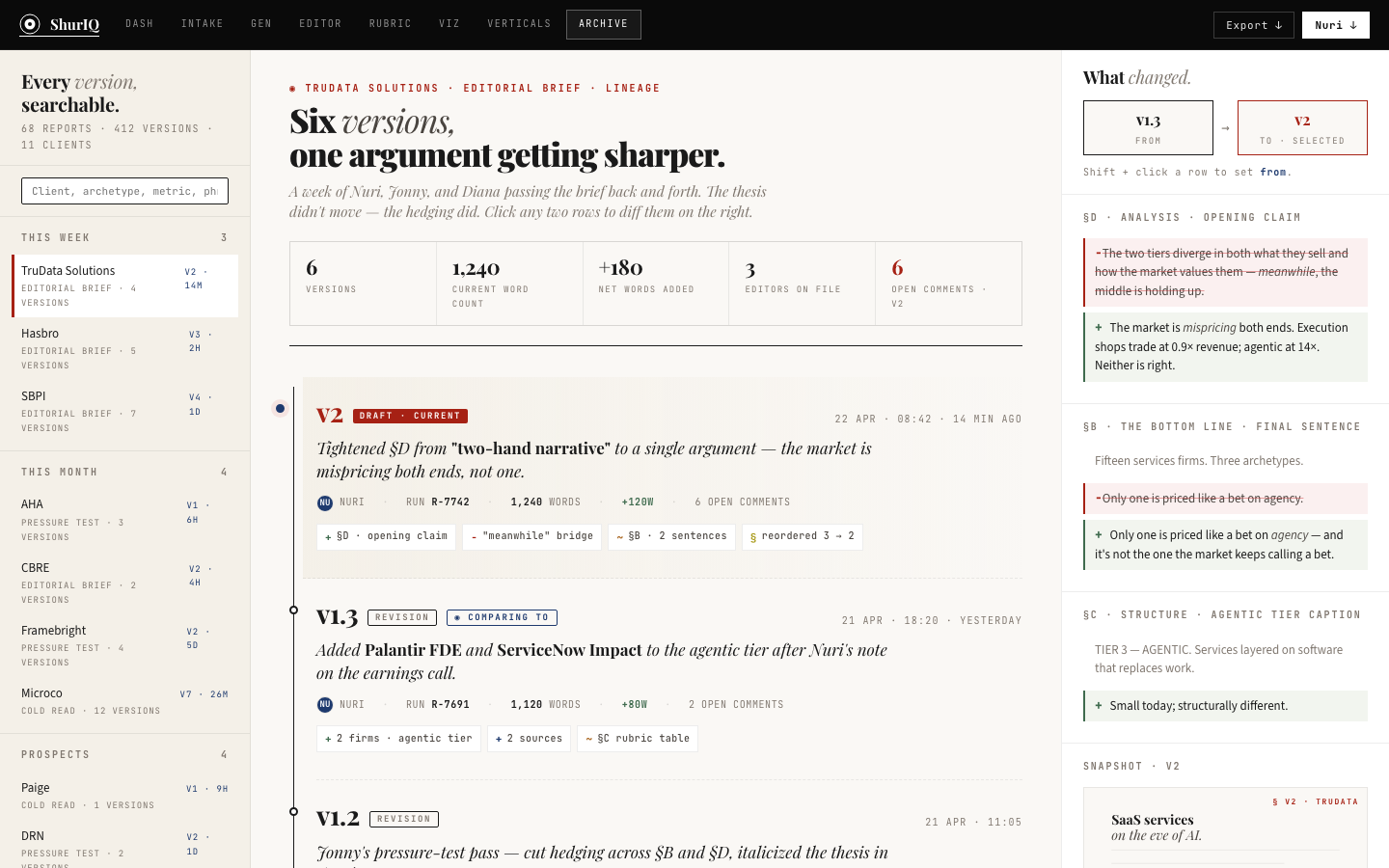
S07 · Versions

Six revisions, one argument getting sharper.

Built

Every brief is version-controlled at the section level. Versions surface tracks every revision, who made it, what changed, why it changed, and what moved downstream (rubric bindings, viz viewports, source tier). The timeline reads like a git log rendered in Playfair — which is, literally, what it is.

Two-pane: timeline on the left, diff detail on the right. The "what changed" pane carries short composed rationale, not opaque JSON — because Limore and Nuri are the readers, not me.

PurposeProvenance for every claim PrimaryDiff revisions + restore ImportsGrammar §18 changelog StatusUI built · git bridge pending
Versions screenshot

§ 04 · Verticals · two screens

The stack rank is its own artifact.

Every vertical we touch — micro-drama, SAP services, heart health, BPO — has a Competitive Stack Rank. Scored monthly. Used twice: once as intake for the subject's SAS, and once as a standalone deliverable if the client wants the whole peer map.

Grammar v0.2a codified this as §09.a (the Stack Rank Intake Artifact rule). These two screens make it real in the Studio: a browser to see the full peer set, and a method appendix that shows every decision behind the score.

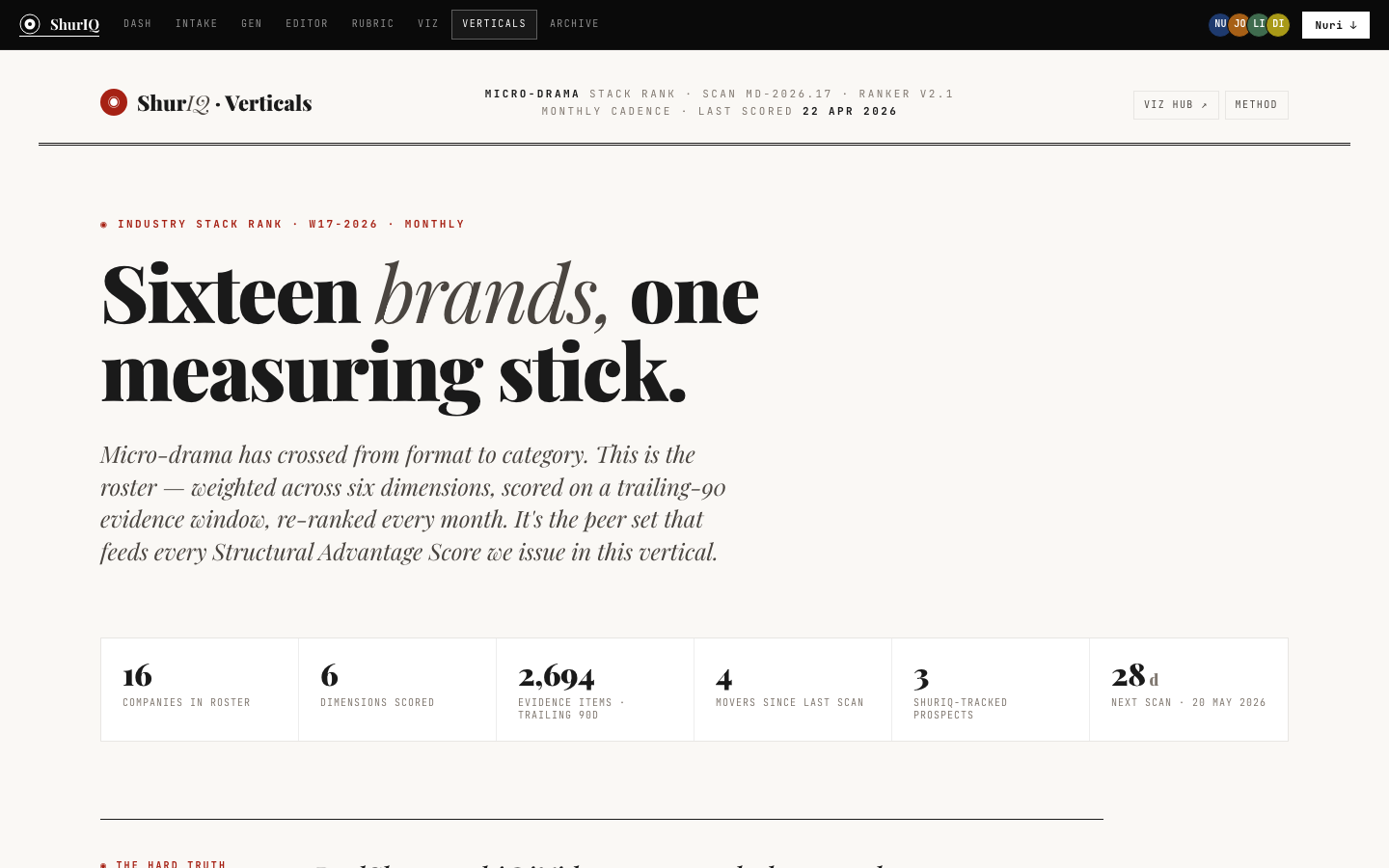
V01 · Vertical Browser

Sixteen brands, one measuring stick.

Built

The roster. For the micro-drama pilot: sixteen companies scored across six dimensions — Content & IP (25%), Market Presence (20%), Revenue (20%), Momentum (15%), Tech (10%), Brand (10%). Trailing-90 evidence window. Re-ranked monthly. Next scan date stamped.

The page is a stack-rank deliverable in its own right — but more importantly, it's the intake input for every brief we write in that vertical. When TruData gets scored, it's scored against this ranking, not against a set we invented on the fly.

PurposeCanonical peer set per vertical PrimaryBrowse + drill + deliver ImportsGrammar §09 + §09.a · rubric bindings StatusPilot data live (micro-drama v2.1)
Vertical Browser screenshot
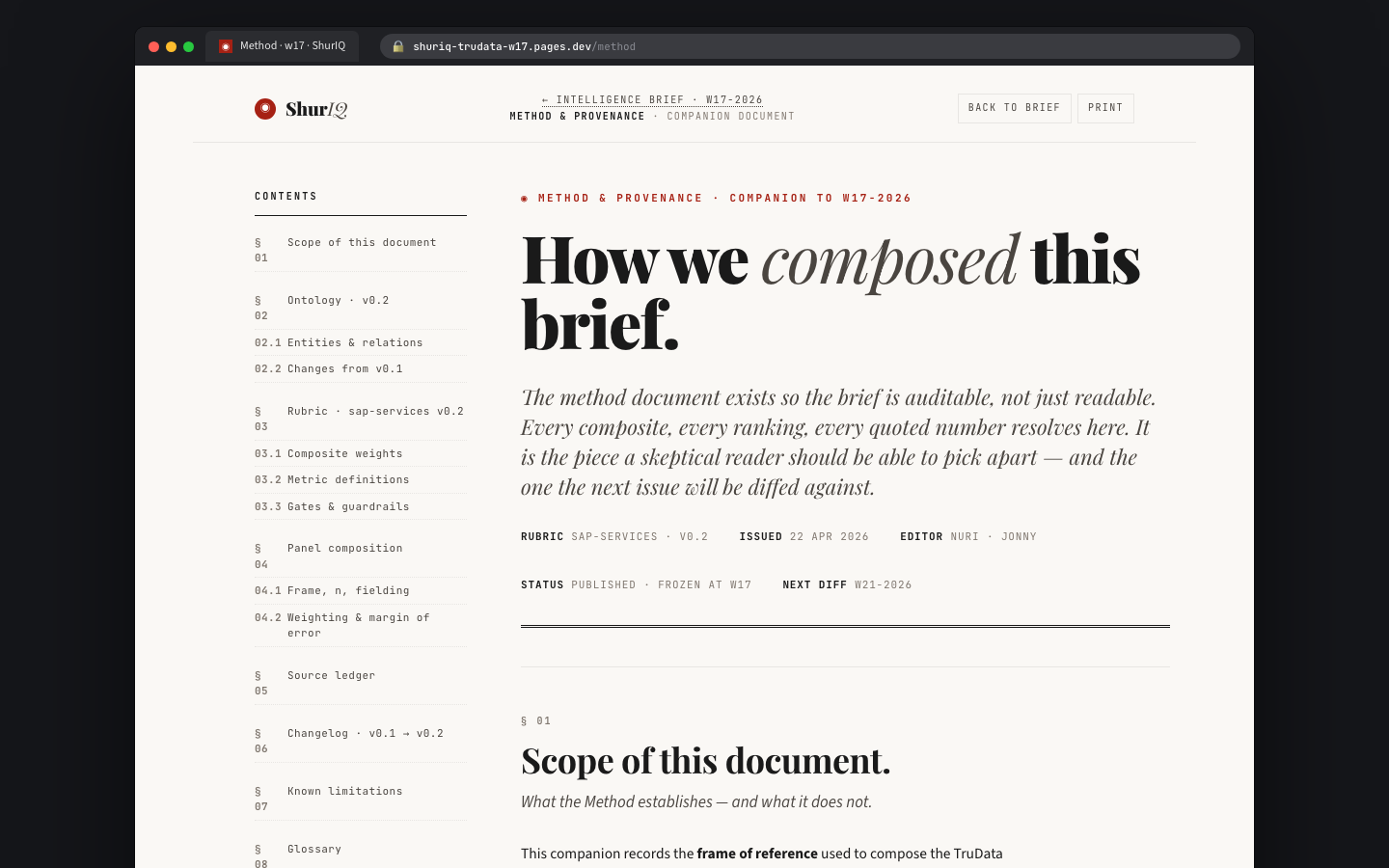
V02 · Method Appendix

How we composed this brief.

Built

Every brief ships with a method companion. The appendix documents scope, ontology version, entity & relation definitions, rubric composite weights, metric definitions, gates and guardrails, panel composition, source ledger, changelog, known limitations, glossary. This is the document a skeptical reader should be able to pick apart — and the one the next issue will be diffed against.

It also serves as the client-proof for the methodology layer. When a CMO asks "where did the 0.828 modularity come from?" — this is the page that answers it, with every denominator visible.

PurposeAuditable method behind every brief PrimaryDiff v-to-v, cite source tier ImportsGrammar §18, Source Ledger, Rubric version StatusTemplate built · auto-generation pending
Method Appendix screenshot

§ 05 · Visual Insights Hub · six screens

Six viewports on a single argument.

The reading room. Every chart in the editorial brief resolves to an interactive view here — topology, gap radar, brand-power pentagon, peer stack, composite, stack rank. Same ontology, six lenses. Think of it as the brief's lab notebook, opened up.

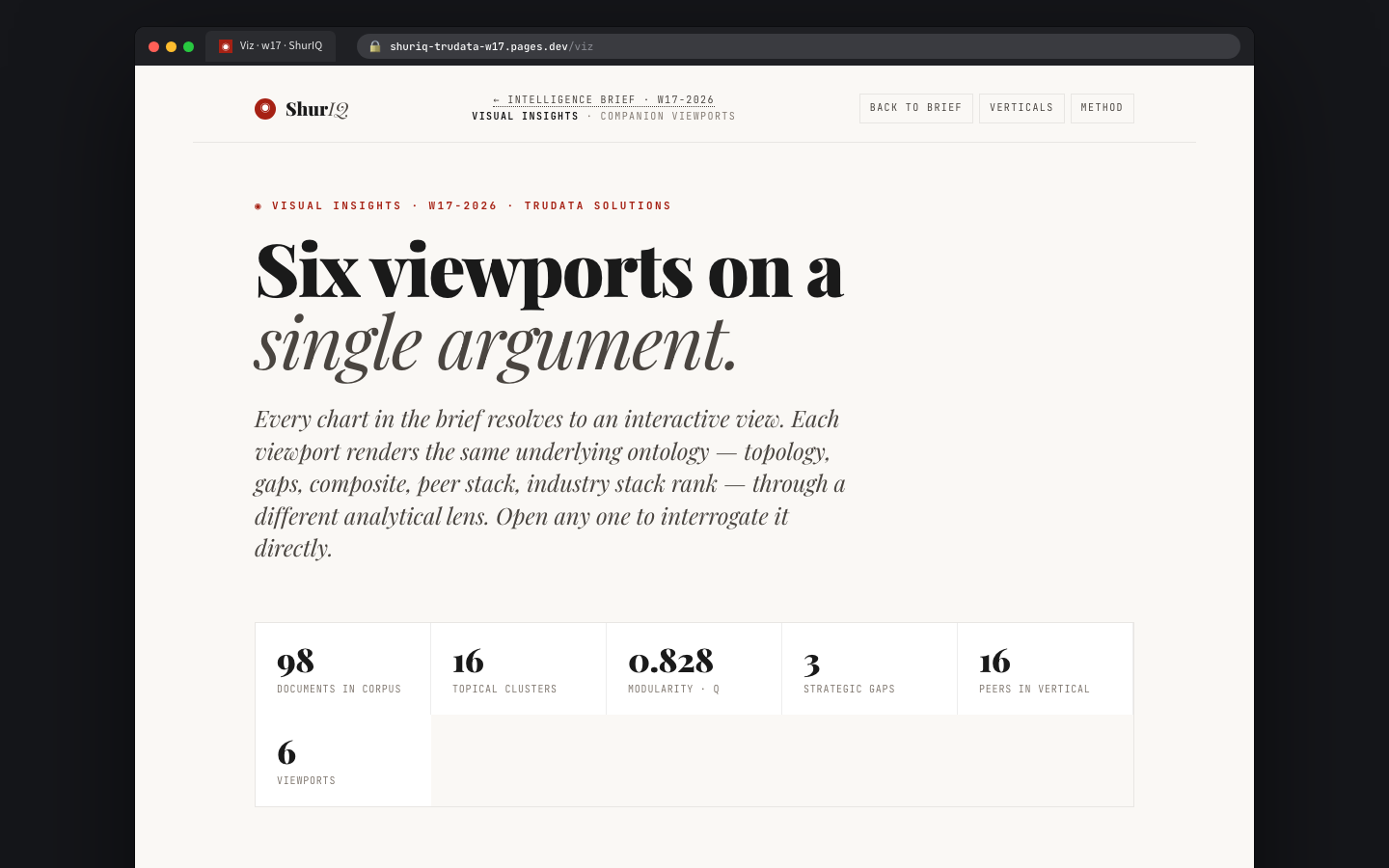
H01 · Viz Hub

Companion viewports.

Built

The hub index. Five stat tiles up top — documents in corpus, topical clusters, modularity Q, strategic gaps, peers in vertical — render the quantitative shape of the argument. Below: six viewport cards, each navigable to its interactive view.

Crucially, this is the client-facing surface. Anything Studio-internal (rubric authoring, version diffs, steering transcripts) stays out of the Hub.

PurposeInteractive companion to the brief PrimaryDrill into any viewport ImportsInfraNodus graph · rubric · grammar StatusLive TruData w17 pilot data
Viz Hub screenshot
H02 · V01 Topology

The vertical, as a graph.

Built

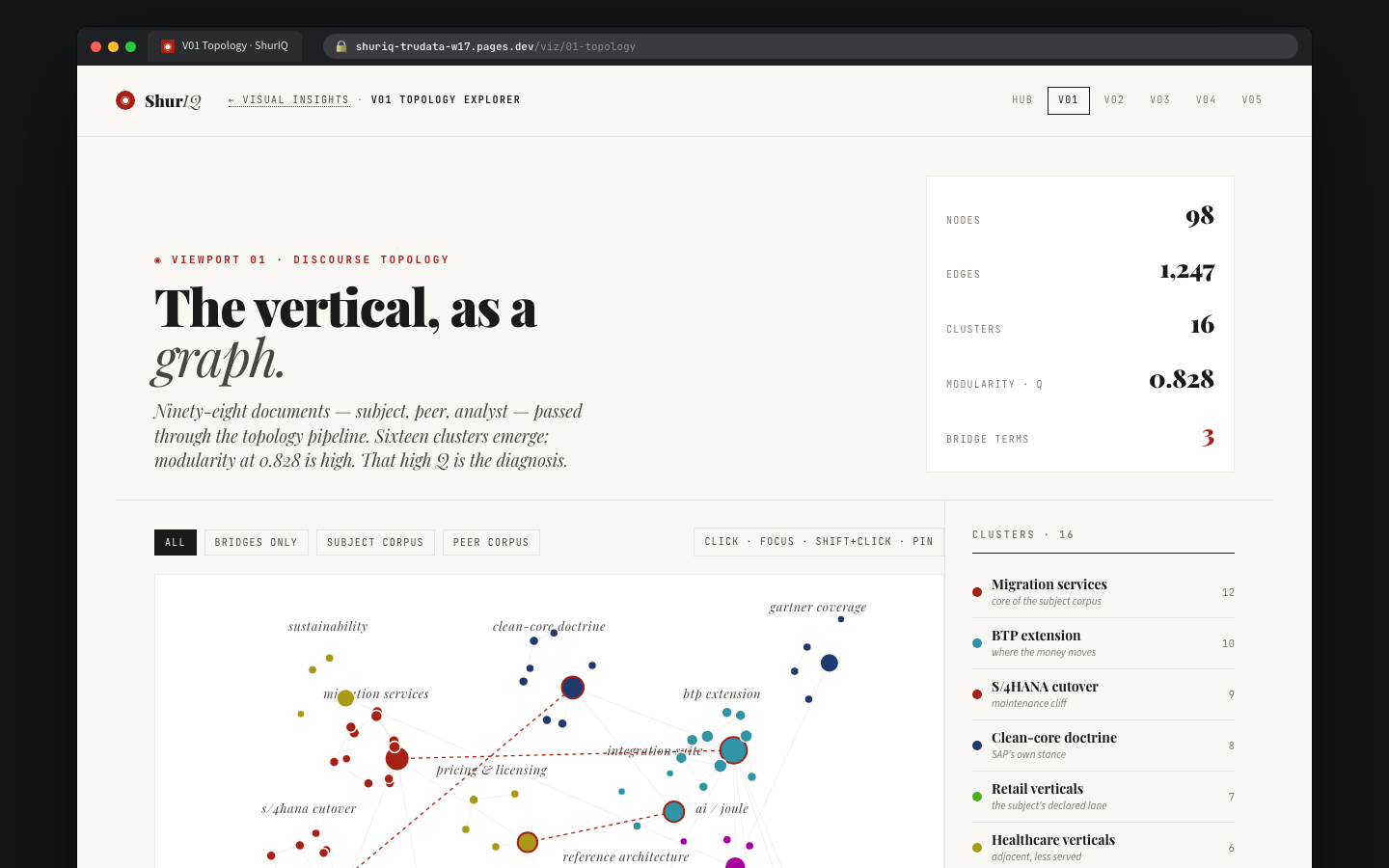
Ninety-eight documents, sixteen clusters, modularity 0.828. The topology viewport is the foundation — it's what tells the operator that the vertical has structure, what the clusters are named, and which bridges carry the strategic weight. Interactive focus + pin on click. Bridge terms called out in the legend.

Every other viewport is a lens on this graph. Gap Radar reads it as severity × tractability. Peer Stack reads it as competitive posture. Pentagon reads it as brand power dimensions. Same graph, rotated.

PurposeDiscourse topology · bridge discovery ImportsInfraNodus export · cluster palette StatusInteractive · TruData graph live
V01 Topology screenshot
H03 · V02 Gap Radar

Three gaps, and their tissue.

Built

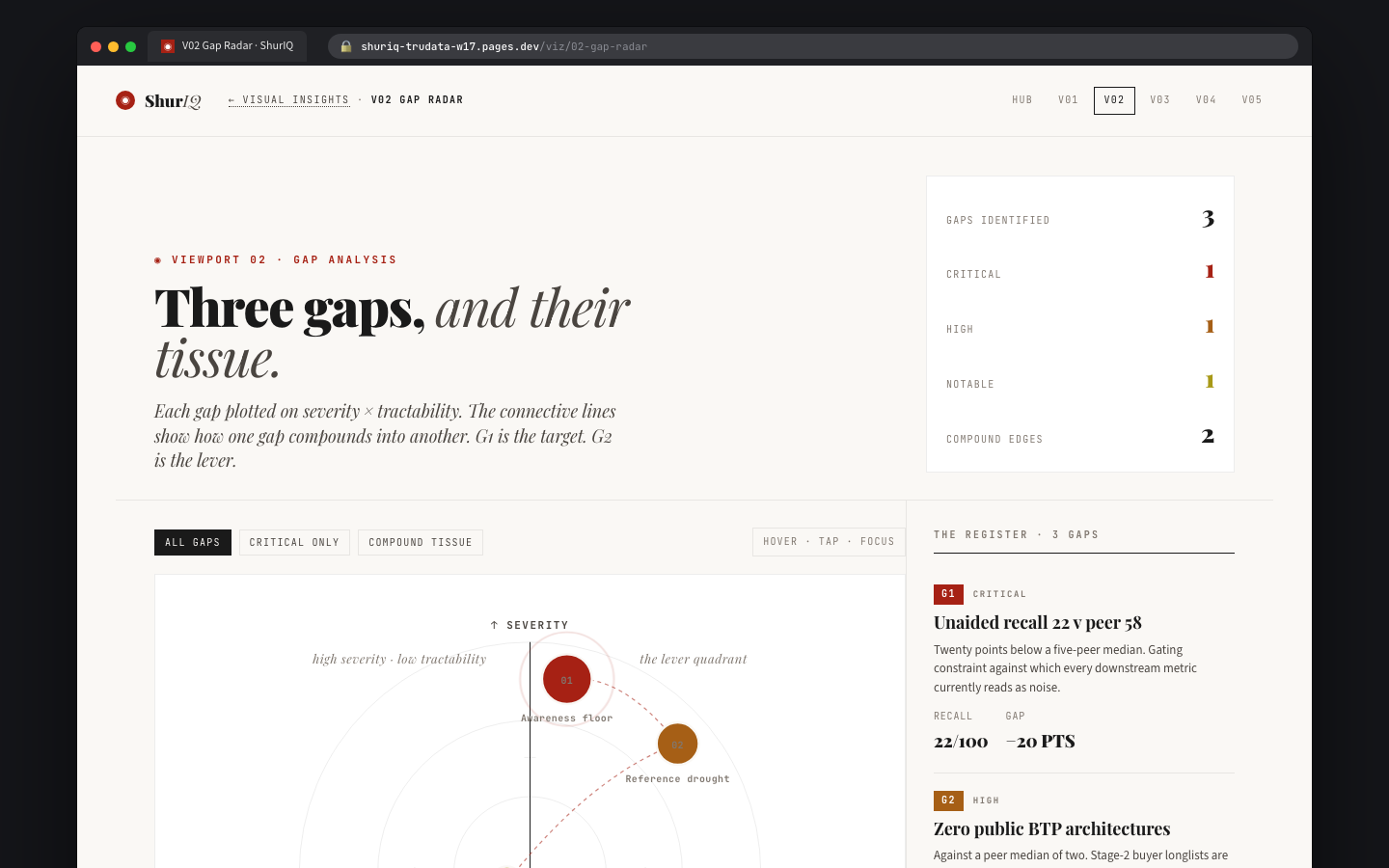
Gaps plotted on severity × tractability. Connective lines show which gap compounds into which — G1 is the target, G2 is the lever that unlocks G1, G3 is the follow-on. Register on the right gives each gap a title, headline claim, and the two quantitative marks that make it real (e.g. Unaided recall 22 vs peer 58).

This is the viewport the CMO reads first. Three gaps is the tractable number; each gets priced as a move.

PurposeGap set · severity vs leverage ImportsGrammar §14 gaps, §16 action StatusInteractive · 3 live gaps
V02 Gap Radar screenshot
H04 · V03 BPS Pentagon

Brand power, five sides.

Built

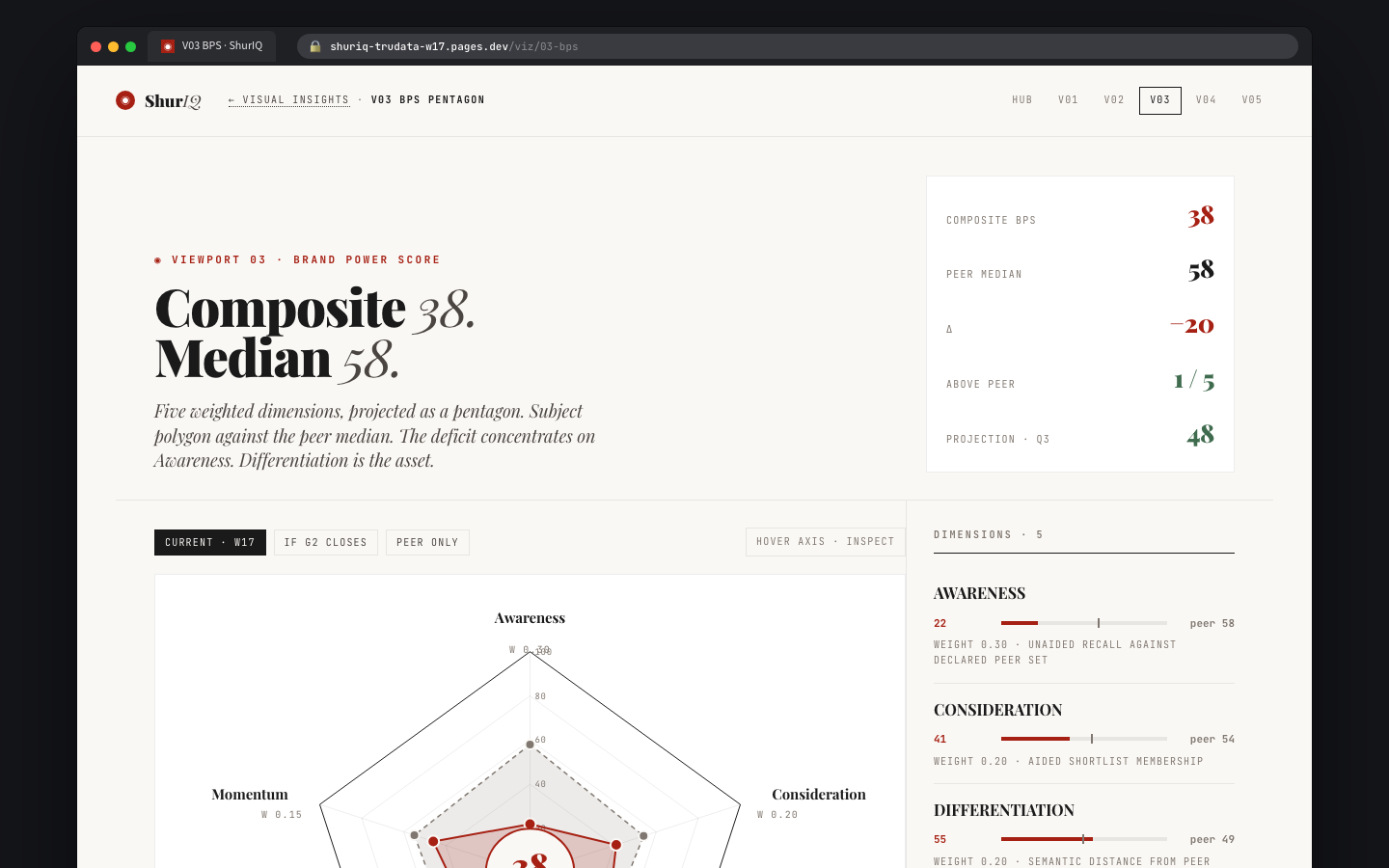
The Structural Advantage Score (SAS) rendered as a pentagon across five dimensions: awareness, trust, mission, differentiation, loyalty. Per-vertical weighting profile. Comparable to peer median so the reader sees where the subject structurally wins and loses — not on a 0-to-100 composite, but on the specific axes.

Note: SAS is the rename. BPS was the working title; v0.2a froze SAS as the canonical term. The screen retains BPS in the URL slug for now.

PurposeSAS dimensions vs peer median ImportsGrammar §15 SAS weights, per-vertical profile StatusInteractive · 5 live dimensions
V03 Pentagon screenshot
H05 · V04 Peer Stack

Pipeline against extension posture.

Built

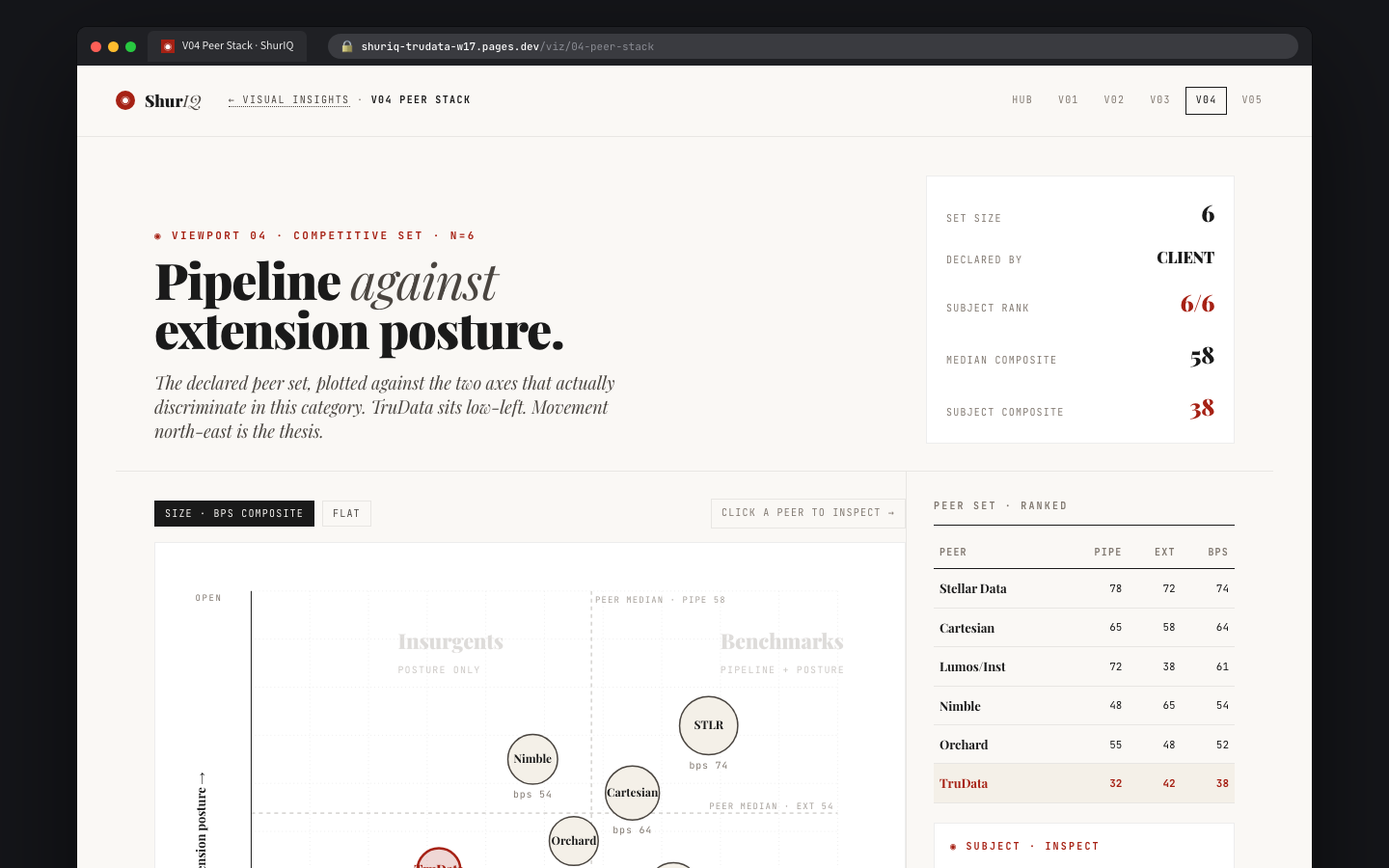
The declared peer set plotted on the two axes that actually discriminate in this category — pipeline × extension posture. TruData sits low-left. Movement north-east is the thesis. The peer table on the right shows the full ranking with pipe, ext, BPS, and subject highlighted in critical red.

This is where "we rank 6/6" becomes a visualization the client understands. It's also where the Stack Rank feeds in as the intake artifact — the peer set was not chosen by us, it was inherited from the vertical.

PurposeSubject vs declared peer set ImportsVertical Browser · Stack Rank · rubric StatusInteractive · 6 live peers
V04 Peer Stack screenshot
H06 · V05 Composite

The full scorecard, on one surface.

Built

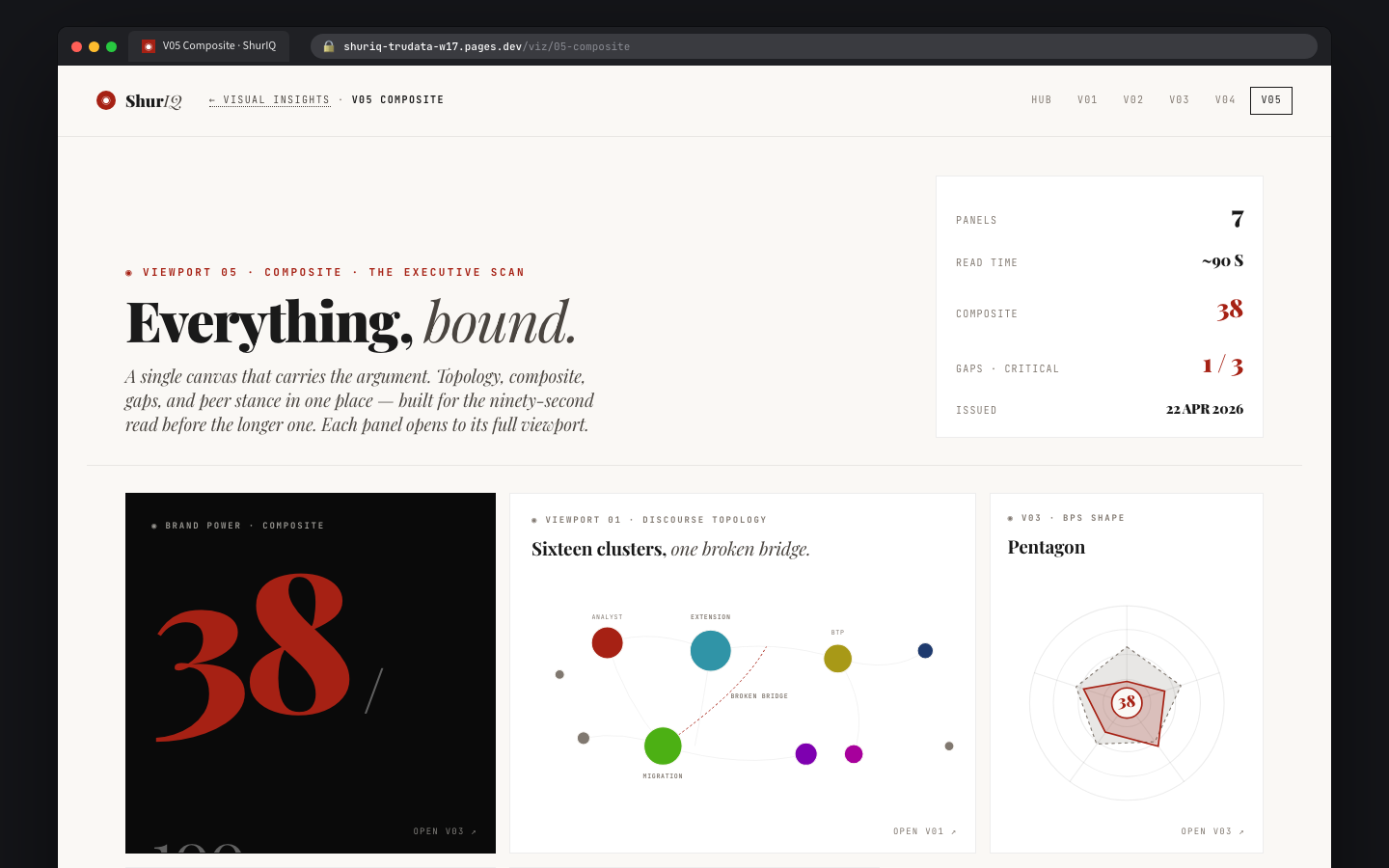
The composite viewport. All five prior views collapsed into a single analytic surface: topology shape (quant), gap register (list), SAS pentagon (scored), peer stack (positional), and the stack rank (ordinal). This is the one the analyst opens when she wants the whole picture in one place.

Also the surface we'll use to let advanced clients query — the composite is where the generative hooks sit (what-if this peer, what-if this rubric, what-if this gap).

PurposeOne-surface composite · analyst mode ImportsEvery other viewport StatusStatic composite · interactions pending
V05 Composite screenshot

§ 06 · What's left

Fifteen screens don't make a working factory.

The prototypes are pixel-perfect and data-plumbed to the TruData pilot. What they are not — yet — is a running system behind real state. Six rollout stages close that gap.

The source repo on GitHub has the design bundle. A separate Software Development Plan is in flight — an expert panel (software engineering, ontology/graph, product/bizdev) will adjudicate four candidate architectures on six axes before we lock the build stack. Handoff is at projects/shur/shuriq-report-studio/SDP-EXPERT-PANEL-HANDOFF.md.

The six rollout stages.

Stage What ships Status Target
01 Vault + Bases + Studio read-only. The Studio renders out of the current totem-terminal Obsidian vault. Markdown is the source of truth. No writes from the Studio yet — an operator still edits in Obsidian; the Studio mirrors state. ● Building w18 · May
02 Studio writes + git commits. The Studio becomes a first-class editor. Every save is a git commit with structured trailers (session-id, intent, surface, stakeholder). Authoring moves from Obsidian → Studio. ◐ Next w20 · May
03 Scheduled jobs. Monthly stack-rank scans, weekly competitive pulses, daily ingest from InfraNodus all run as cron, not me. Diana wakes up to a generated intake pre-loaded for the week's brief. → Spec w22 · June
04 Headless cloud. The Studio runs server-side on Cloudflare Workers or similar. Agents can compose, rubric-check, and commit without a local machine. Multi-operator state becomes real. → Spec w26 · July
05 SPARQL · hosted semantic layer. The per-prospect knowledge graphs become queryable. Brand/company/industry subjects get durable RDF identities. Clients can ask the graph questions in plain English and get traced answers. ○ Later w30 · Aug
06 Client portal. Each client gets a private read-surface into their briefs, their stack rank, their composite, their changelog. Gated, audited, per-tenant. This is where Report Studio becomes ShurIQ the product. ○ Later Q4

What the expert panel decides.

Eight decision gates, before the build stack locks. Each gate names a payer, a reversibility cost, and a recommendation:

  1. Storage primacy — vault-only, vault + derived DB, or DB-primary with markdown export?
  2. Knowledge graph engine — RDF/SPARQL (Oxigraph, Fuseki) or property graph (Memgraph, Neo4j)?
  3. Ontology strategy — bespoke ShurIQ schema, or build on schema.org + DOLCE?
  4. Runtime — Cloudflare Workers, Vercel, or self-hosted?
  5. Multi-user model — Google OAuth, Clerk, or custom tenant auth?
  6. Stage 1 deploy target — pages.dev preview, private staging, or limited prod pilot?
  7. Client portal timing — Stage 6 (as above), or pulled earlier for commercial pressure?
  8. Commercial packaging — per-seat, per-brief, or retainer + scan?

§ 07 · Closing

What this unlocks.

Three things become possible the moment the Studio is live end-to-end.

The bench scales without me. Any of us can run a pilot scan, hit the gate, and ship a brief. Nuri doesn't wait for my calendar. Diana can run Wednesday intake while I'm in a pitch Thursday. The grammar lives in the tool, not in my head.

Every brief compounds. Because §09.a made stack rank an intake artifact, every brief adds to the vertical's ranking. Every pentagon feeds the SAS history for that subject. Every rubric hit sharpens the rubric. The work stops being episodic and starts being cumulative — which is the product ShurIQ has always wanted to be.

The method becomes the moat. The Method Appendix, the rubric version, the versioned graph — none of these are bolted on. They're how the Studio works. A client who pays for this is paying for auditability, not for a deck — and a competitor who tries to replicate it has to rebuild the whole scaffolding, not just the chart library.

Fifteen screens, three surfaces, one grammar. The factory, ready to be wired.

Grammar v0.2a · Studio prototype · w17-2026 · Prepared for Nuri, Limore, Diana